

The Closed-Position List
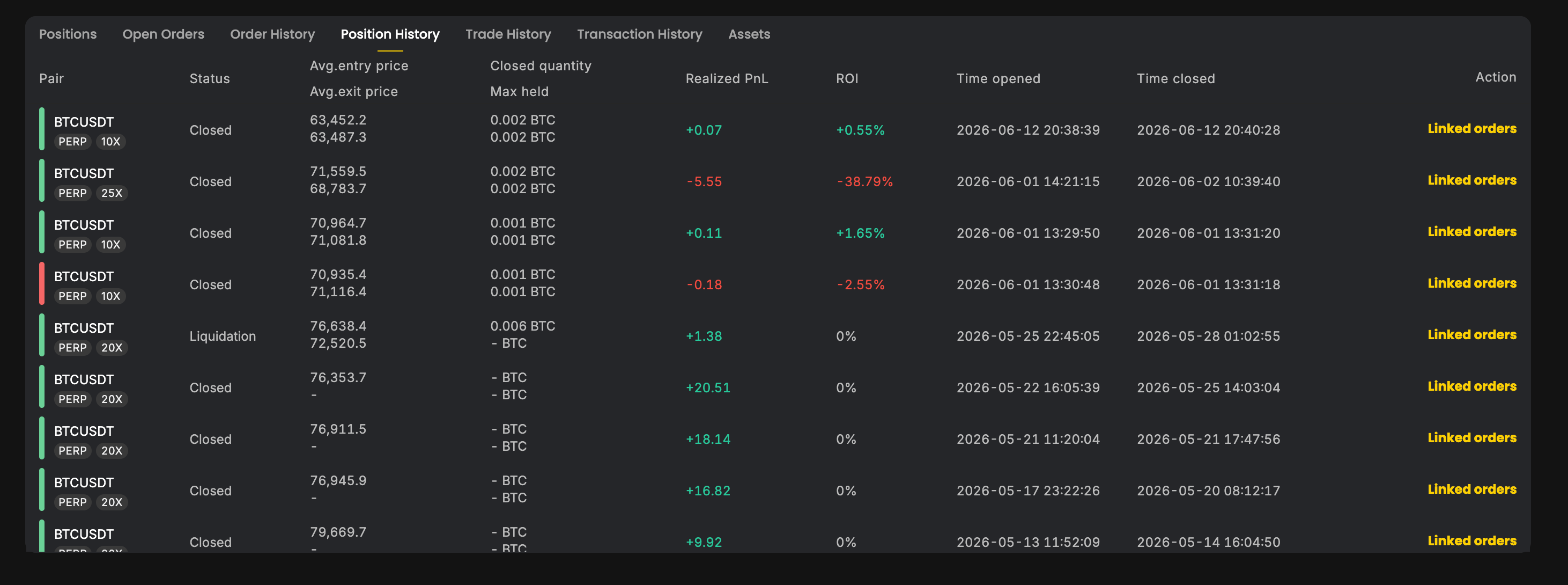
Position History lists every closed perpetual position with the details you need to review a trade at a glance:- Entry and exit price — the average prices at which the position was opened and closed.
- Realized PnL — the final profit or loss, after fees.
- Total fees — trading fees paid across the life of the position.
- PnL ratio — your realized PnL as a percentage of the margin committed.
- Close reason — how the position ended:
- Normal close — you closed it yourself (fully or partially).
- Liquidation — it was closed by the liquidation engine.
- Auto-deleveraging (ADL) — it was closed as a counterparty to another account’s liquidation.
Filtering & Sorting
Find specific positions quickly:- Filter by market — narrow the list to a single perpetual symbol (e.g. BTC-PERP).
- Filter by open time or close time — restrict to a date range.
- Sort by open date or close date — order the list by when positions were opened or closed.
Browsing Long Histories
Position History uses cursor-based pagination, so you can scroll smoothly through thousands of historical positions without hitting page limits or losing your place.Per-Fill Detail View
Open any closed position to see the individual fills that built and closed it. Each fill shows:- Direction — buy or sell.
- Size — the amount filled.
- Price — the execution price of that fill.
- Fee — the fee charged on that fill.
- Execution type — how the fill occurred:
- Trade — a normal match against the order book.
- Liquidation — a fill created by the liquidation engine.
- Takeover — a fill created when the position was taken over during liquidation or ADL.
A single position can contain many fills — for example, a large order that filled in pieces, plus the fills that later closed it. The per-fill view is the most granular record of exactly how a position was executed.